
When it comes to building a networking stack, the most common advice online is to ditch your ISP’s router for another (usually premium) option. After all, they tend to lack advanced features, use outdated firmware, and have the added risk of remote access backdoors, making them much worse than custom routers. But if you’re part of the home lab community, it’s all about building a DIY firewall/router with plenty of security provisions to keep your network stack safe.
In fact, it’s been a long time since I built my current OPNsense setup, and it hasn’t disappointed once yet. Hell, even if you leave aside the added security benefits of my DIY router, its recursive DNS, mesh VPN, and ad-blocking features made it worth unplugging my old ISP router and throwing it in the trash.
5 reasons to replace your basic router with a pfSense or OPNSense box
A custom router and firewall give you many more options.
OPNsense serves as the centerpiece of this setup
It is easy to use and has many utilities to its credit
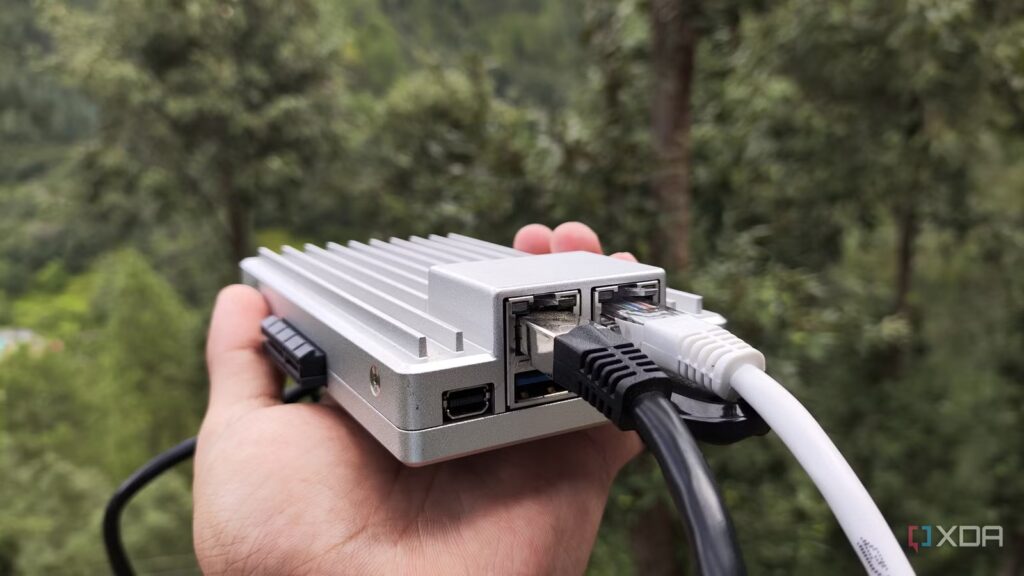
Although it’s technically only available on x86 machines, I consider OPNsense to be the best router distribution, by far. Between its formidable firewall provisions, Suricata IPS (and IDS), VLAN management tools, and traffic monitoring utilities, OPNsense has all the makings of a good router distribution. Unlike ISP routers, which tend to become obsolete after a few years, OPNsense receives frequent updates and patches. So I don’t have to worry about old FreeBSD vulnerabilities reducing the security of my router or not getting new features. As unbalanced as it may seem, I run my OPNsense instance on a single board computer. Specifically, I’m using the ZimaBoard 2 as a host machine, which features an x86 processor and two RTL8125B 2.5G ports, and OPNsense integrates well with the small system.
The best part? OPNsense has the smoothest difficulty curve of any router distribution I’ve tinkered with. Of course, I wouldn’t say it’s easy, but it’s definitely the most accessible option among its rivals. Configuring new interfaces, tweaking firewall rules, and changing VLANs is quite simple, as OPNsense categorizes each option into aptly named tabs. The advanced settings are also quite documented, and OPNsense’s modern web UI makes the router’s operating system more convenient for my networking projects (and the subsequent troubleshooting process after botching said experiments).
OPNsense plugins helped me add DNS, VPN and ad blocker functionality to my router
AdGuard Home + Unbound is a powerful combo for my DNS needs
As if its inherent features weren’t enough, the real revolutionary aspect of OPNsense is its massive support for first-party and third-party plugins. For example, I configured AdGuard Home as an ad blocker for OPNsense, and all thanks to the mimugmail plugin. I could have just used Unbound, especially since it’s integrated with OPNsense, and configured Steven Black’s blocklists to make it a DNS sinkhole. However, I prefer AdGuard’s intuitive GUI for my ad blocking needs, especially when it comes to checking my traffic data reports. Additionally, Adguard is better at setting up custom device blocklists.
That said, Unbound has its own utility in my OPNsense router. I configured it as a recursive DNS server for AdGuard, which involved changing the default ports for both services to OPNsense. Rather than relying on upstream DNS servers – like Google or Cloudflare – my Unbound recursive DNS chains my queries through root, TLD, and authoritative servers, essentially making it harder (but unfortunately not impossible) for my ISP to track my online escapades. In addition to removing upstream server requirements, Unbound also handles DHCP leases and local hostname resolution in my setup.
I also turned my OPNsense instance into a Tailscale subnet router

By default, OPNsense supports WireGuard, OpenVPN, and IPsec protocols for a self-hosted VPN setup. But because my ISP has locked my home network behind a CGNAT, exposing a local VPN to remote setups is nearly impossible without additional workarounds. So I rely on Tailscale for my remote access needs, and with OPNsense including an official plugin, setting it up on my DIY router was a breeze.
Hell, I even enabled the exit node and subnet router functionality for my OPNsense Tailscale node. The former is perfect for when I’m thousands of miles from home and need to access banking services, government websites, or anything else that might block international traffic. Likewise, if I need to access the Internet from a public Wi-Fi network, my OPNsense exit node channels traffic from my smartphone, MacBook and tablet through my home network, preventing curious people on the public network from spying on my browsing data.
Meanwhile, advertising subnets on my OPNsense router lets me connect to every device on my home network from another node, even if I haven’t already armed them with Tailscale. Sure, Tailscale may have removed the maximum device cap on its free plan, but keeping a single OPNsense subnet router instead of setting up the mesh VPN on dozens of VMs, bare metal platforms, and containers makes my Tailscale console clean and organized.

Tailscale Funnel is the most useful and underrated Tailscale feature
On-demand end-to-end encrypted p2p VPNs are amazing
Besides my OPNsense plugins, I always have a dedicated networking stack
OPNsense can host my ad blocker, DNS resolver, and mesh VPN, but they’re far from the only network-centric tools in my arsenal. NetBox, for starters, provides enterprise-grade IPAM and DCIM provisions, making it the perfect documentation tool for my chaotic home lab. I also have a NetAlertX instance connected to my Home Assistant hub for wacky automations, while Authentik is my SSO server of choice. Then there’s the Pulse container, which tracks the availability of every desktop in my arsenal. And we’d be here all day if I discussed the Kali Linux penetration testing tools that I use every few months to test my home lab security.
