
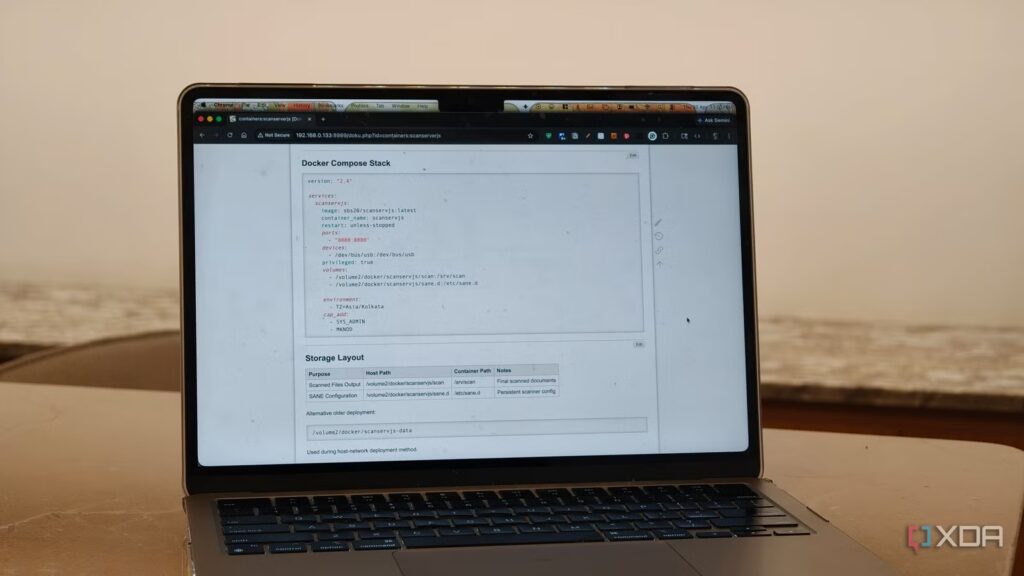
As a self-hosting enthusiast and someone who writes about cool new open source tools, I install and test way too many tools and services every week. Yes, I have a separate environment fully set up for testing, and things break sometimes. For the longest time, I thought that backing up my Docker configuration just meant backing up my containers. As long as my volumes, essential folders, and composition files are safely backed up, everything should be fine. Ideally, this should be enough to redeploy my entire setup within a few hours in the event of an outage. But this is not always true.
Whether it’s a storage failure, a bad update or migration, or even moving to a new server, tells you that it’s easier said than done. Yes, restoring containers is easy, but restoring your configuration is not. Docker Compose is what tells Docker what to run. But that doesn’t explain why an application uses a custom network, or why I placed a database on a separate volume, or why I mounted an external library a certain way. So I embarked on a project to organize all my Docker Compose files and start documenting them using DokuWiki. Essentially, I stopped treating Docker Compose as my only backup plan and added documentation to the process. All this in a proper Wiki style software where I store the context behind each deployment. Honestly, this has and will continue to save me more time in the future than a simple backup.
Your Compose file doesn’t show you context
Documenting Your Stack Makes Recovery Really Possible
In reality, a Compose file should be enough to get your services back online. They define the service and everything involved in it, including the image name, ports, volumes, environment variables, restart policies, networks, etc. Pretty much the complete setup. But in a real-world environment, this doesn’t give the full picture.
Take for example my Immich setup. The Photos library is on a specific volume, the Docker data is on another volume, Postgres has its own persistent directory, and I mounted an external library inside the container using a different path than the host. This stack works perfectly for my needs and meets my requirements for how I have everything organized on my server. But if I have to rebuild it six months later, this basic Immich Compose file wouldn’t be enough. I have to remember that my external libraries need to be mounted in a specific way, where Postgres data is located and which folders are essential for backup. I could of course just dig around and find this information, but that is tedious and time consuming. This is where documenting and organizing files via DokuWiki comes in handy.
I created a page for each stack, whether it’s Immich, Jellyfin, my reverse proxy, home lab monitoring, dashboard, etc. I paste my stack file and write everything that matters. Things like the location of persistent data, folders that need to be backed up, permissions that need to be granted, network dependencies, and jobs. Since I also host a fair amount of services on my NAS, this includes simple details such as PUID and PGID details for deployments. In fact, my goal here in organizing and documenting my Compose files is that if the server goes down tomorrow, I shouldn’t have to trust my memory. The documentation should be enough to get everything back online.
Redundancy is more than just backups
Documentation makes recovery faster and updates more secure

The other thing that DokuWiki has changed is my approach to redundancy. No, I’m not talking about RAID, backups, snapshots, or offsite backups. I configured them, yes. And all of this is important. But I’m talking about knowledge redundancy. This is the real problem. This is a problem I faced a while ago when an analytics server container I had deployed on a Raspberry Pi died due to a faulty memory card, and I had no idea what loopholes I had taken to get it to work. Fortunately, solid documentation was enough to restore it and saved me hours of figuring out what I was doing wrong.
Many self-hosted setups grow over time. You can install an app for media, another for photo backups, maybe a few test containers, plus reverse proxies, dashboards, and more, and it all works perfectly. Until one day that’s no longer the case. By organizing my Docker Compose files and efficient documentation, I have all the foundations needed to get my system back on track in hours instead of days. I have pages for deployment checklists, update routines and recovery steps.
This level of organization also makes updates more secure. If a major container update changes database requirements or volume structure, I document it properly. If an update breaks something, I have all the details in place to recover my configuration.
Docker backups are only useful if you can easily rebuild
Sometimes the simplest upgrade to your self-hosted setup is to make your setup viable and easily replicable. Organizing my Docker Compose files with DokuWiki did this for me. With proper organization and documentation, it turns your Compose file backups into a proper recovery plan. Most importantly, it provides system redundancy beyond storage by giving you the tools to efficiently restore your configuration in hours, instead of days.
