
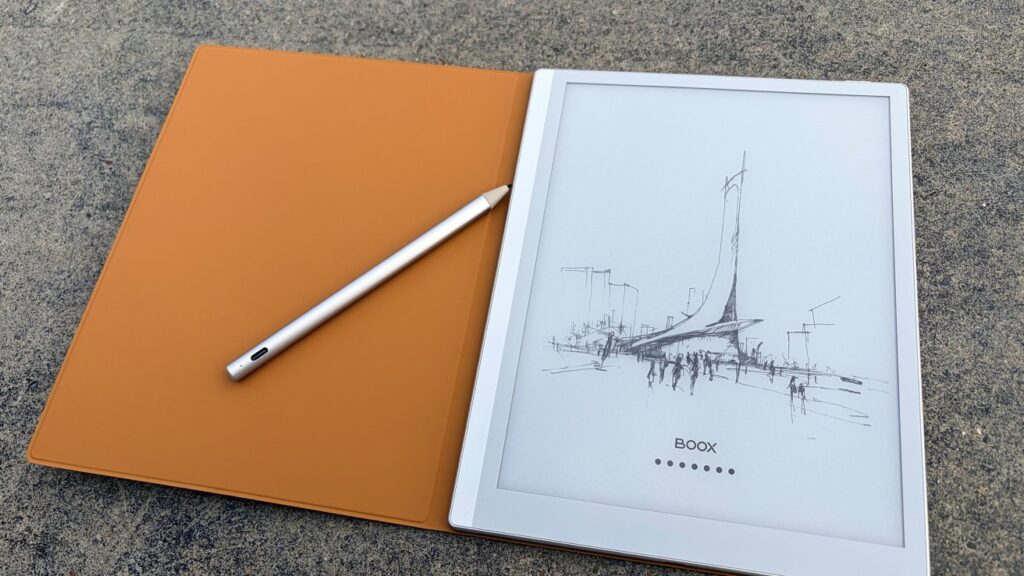
Boox has refreshed another model in its lineup, the Boox Go 10.3, adding a new optional feature while somewhat disappointingly removing something users really liked.
Boox is back with the programming refresh. This time we’re looking at the second generation Boox Go 10.3, Boox’s e-ink tablet in iPad Air form factor.
Boox Go 10.3 Gen II review: Design
The Boox Go 10.3 is, as its name suggests, a 10.3-inch diagonal tablet. This gives it slightly less screen real estate than the 11-inch iPad Air.
Boox has really tweaked the design of many of its e-readers, and the Go is no exception. It’s thin, but doesn’t feel flimsy, so you’ll be more likely to toss it in your bag.
Like many Boox offerings, it also has a dedicated thumb rest area on one side. I appreciate this, especially because one of my main complaints with reading on the iPad is that it doesn’t really give you a good place to type.
In addition to the tablet itself, you also receive a folio-style case. The quality is good, but if you’re used to Apple’s folio cases, it’s actually a bit disappointing.
Boox Go 10.3 Gen II review: The folio, which is included with your purchase, is a bit of a failure
It’s a faux suede material, which I have historically disliked for heavily handled devices. However, I understand that this is a personal preference; I’m just afraid it will be way too difficult to clean.
Again, it’s not bad, but the magnets are significantly weaker, so it doesn’t feel as secure. Also, I don’t like that the piece that holds it closed is detachable – I’ve had it fall in my bag before.
But when it comes to the tablet, I really like its design. I think Boox understands that people appreciate the portability and convenience of these e-reader type tablets.
Boox Go 10.3 Gen II review: Under the hood
As is the case with most Boox offerings, this update represented a very minor spec jump from the last generation. I guess the argument is that if it ain’t broke, it shouldn’t be fixed.
This model has a black and white display only. I assume at some point Boox will create a color model, just like it did with the Go 7.
That being said, the move to Android 15 from the previous Android 13 is appreciated. Android 15 is not exactly newbut it’s been two years newer.
It still features the 300ppi (2480×1860) resolution, HD ePaper screen and octacore processor. Like previous generations, it also includes 4 GB of RAM and 64 GB of memory.

Boox Go 10.3 Gen II review: the screen is stunning and pleasant to look at
I don’t like that the Go only has 64GB of memory with no microSD slot. If it’s primarily going to be used for reading and taking notes, it should be fine.
However, if you start loading productivity apps on it or want to use it for audiobooks, that space might seem a bit limited. You can plug a USB-C hub into it, although it feels strange to do so if you’re holding the tablet at the same time.
The 3,700 mAh battery is decent, especially if you don’t use (or have access to) a front light. Even using the headlamp to read in the evening, I still did it for several days before having to recharge it.
And, if I’m honest, I’m more likely to start charging it out of habit way before it needs it. If you’re the type of person who charges your iPhone or iPad daily, you know what I mean.
There are built-in microphones and speakers. You can listen and record on it, but whether you want to or not is another matter. We’ll talk about that in a moment.
And finally, it includes an Inksense stylus. I’ll get into that in a bit more, but to summarize, this is a stylus with 4,096 levels of pressure.
If you’re familiar with other Boox products that use it, you’ll know what you’re getting.
Boox Go 10.3 Gen II review: what it does and doesn’t do
As with every Boox offering, I like to remind people that this isn’t an iPad. It’s somewhere between a Kindle and an iPad.
So let’s start with what it does well. I love the reading experience on a Boox tablet, and the Go is no different.
Flipping through a book or a long document is quick and easy. We don’t feel particularly limited by the 4 GB of RAM for this use.
And, as an e-reader, it supports many document formats. This includes PDF, CAJ, DJVU, CBR, CBZ, EPUB, EPUB3, AZW3, MOBI, TXT, DOC, DOCX, FB2, CHM, RTF, HTML, ZIP, PRC, PPT and PPTX.
As an Android device, it also has access to the Google Play Store. Although you’re definitely not going to install games on it, it handles Evernote and Google’s suite of apps, like Docs and Sheets, very well.
It’s a pretty fast little tablet, even with an older operating system. This is one of the things Boox has always done well.
I will say that it is crucial to keep Boox tablets up to date with current firmware. I once wrongly assumed that I had received a wrong unit, only to discover that a bug had been fixed in an update that I decided to ignore.
The Boox Go also supports WAV and MP3 files. I should point out that at no point will you want to listen to anything through the speakers – they’re not great.
But it does support Bluetooth, which means you can pair your favorite wireless headphones with it. Honestly, it’s a really good way to listen to audiobooks, as you’re unlikely to be interrupted by the myriad of interruptions that come with an iPad or iPhone.
Boox Go 10.3 Gen II review: Even without the EMR stylus, it’s still pretty good
And the 10.3-inch design is pretty close to a standard sheet of paper, making it an ideal desk companion. Plus, it’s a great way to annotate documents.
Now let’s talk about the weak points.
If you’re used to the blazing speeds of an iPad, even a decidedly old one, you’ll want to temper your expectations here. Although the processor seems good for basic tasks, the display is a limiting factor if you’re navigating a lot of menus.
I found this to be more evident when using third-party apps.
Again, this isn’t a device designed to replace your iPad. This is a device designed to replace your Kindle.
Or, in any case, you should consider it as a complement to your current technology setup.
The one place I was most disappointed was the stylus.
Boox Go 10.3 Gen II review: the EMR stylus has been replaced by a capacitive model
To be clear, the stylus isn’t bad. But it’s a downgrade from what came with the first-generation Boox Go line.
The first generation featured a Wacom EMR pen, which uses electromagnetic resonance to communicate pressure and position. The result is a fast and smooth writing experience.
This generation receives the Inksense stylus. This is a capacitive touch pen, which means it works the same way as your fingers.
Yes, there are still 4,096 pressure levels. The response time is correct and the handling is pleasant.
But if you’ve used a DME pen, especially with a Boox device, this feels like a step backwards.
Boox Go 10.3 Gen II review: Lumi versus Standard
Technically, there is two versions of Go 10.3: the Lumi edition or the standard.
The Lumi version comes with pretty standard front lighting, which I always loved. It has a wide range of color temperatures and I tend to keep mine firmly shifted towards the warmer end of the spectrum.
If you work indoors or like to read in the evening, this quickly becomes essential. And until now, front lighting was universally available on all Boox models.
As is the case with previous Go generations, Boox has not included a front light on the standard model. I think the company chose a very specific audience.
Boox claims that this option is ideal for people who will be using the Boox outdoors or in bright environments. I agree, the device works wonderfully in bright environments and under midday sun.
Boox Go 10.3 Gen II review: daylight reading is excellent on both models
You know, the same way a book does.
But I can’t imagine buying an e-ink tablet that doesn’t have a front light. But then again, I interface my eink devices primarily from the comfort of my bed, where I read until I pass out.
I will say, the standard edition do costs less, so there’s probably still a market for it. However, if I was personally in the market for an e-reader, I would pay an extra $50 to get the front light.
Boox Go 10.3 Gen II review: Overall
As I said before, Boox makes good devices. I try a lot of e-readers as a side effect of my job, and Boox is the reigning king.
Boox has a very large and loyal audience, and I count myself among them. While this specific Boox device isn’t my favorite, I think it’s a great choice if you want something that’s a good balance between book and notebook.
My favorite Boox devices tend to be the smallest ones, meant to trade writing experiences for ultimate portability. I talk about it a lot, but I think the Boox Palma is such a cool little e-reader.
However, this sort of relegates these devices to the realm of a one-trick pony. You don’t take notes on the Palma, and even the Boox Mini is too small to write comfortably for more than a few minutes at a time.
This is not the problem with Boox Go 10.3. This device trades a little convenience for a lot of utility as a note-taking device.
And for most people, I feel like that would make it one of, if not the best choice for an e-reader.
Benefits of Boox Go 10.3 Gen II:
- 10.3-inch size splits the difference between a book and a notebook
- Android 15 will receive updates for at least three years
- Thin, light, but not fragile
- Excellent battery life
- Front light optional
Disadvantages of Boox Go 10.3 Gen II
- 64 GB can be limiting if you store audiobooks or third-party apps
- Missing speakers and microphone
- Capacitive touch pen instead of EMR pen
Rating: 3.5 out of 5
Where to buy
The version I tested, the Boox Go 10.3 Gen 2 Lumi, can be purchased on Boox’s website for $449 and includes the tablet, stylus, and a folio-style case. If you don’t think you need the front light, you can buy one for $399.
The Boox Go 10.3 Gen II is also available on Amazon. The Lumi version costs $449.99, while the no-light version costs $419.99.
