Apple announces AI-based accessibility features and visual wheelchair control
Apple today announced that it is using AI to boost the power of a number of accessibility features. These include VoiceOver, Magnifier, Voice Control and Accessibility Reader.
Additionally, power wheelchair users will now be able to use their eyes as controls when using Vision Pro…
Apple says it hasn’t compromised privacy by adding AI capabilities to its accessibility features.
“Apple’s approach to accessibility is like no other,” said Tim Cook, Apple CEO. “Now, with Apple Intelligence, we’re integrating powerful new features into our accessibility features while maintaining our core commitment to privacy by design. »
“The accessibility features our users rely on every day become even more powerful with Apple Intelligence,” said Sarah Herrlinger, senior director of global accessibility policies and initiatives at Apple. “With these updates, we bring new intuitive input, exploration and customization options, designed to protect user privacy at every step. »
VoiceOver and Magnifier
VoiceOver and Magnifier help blind or visually impaired users understand both on-screen information and their surroundings. Both get an AI boost.
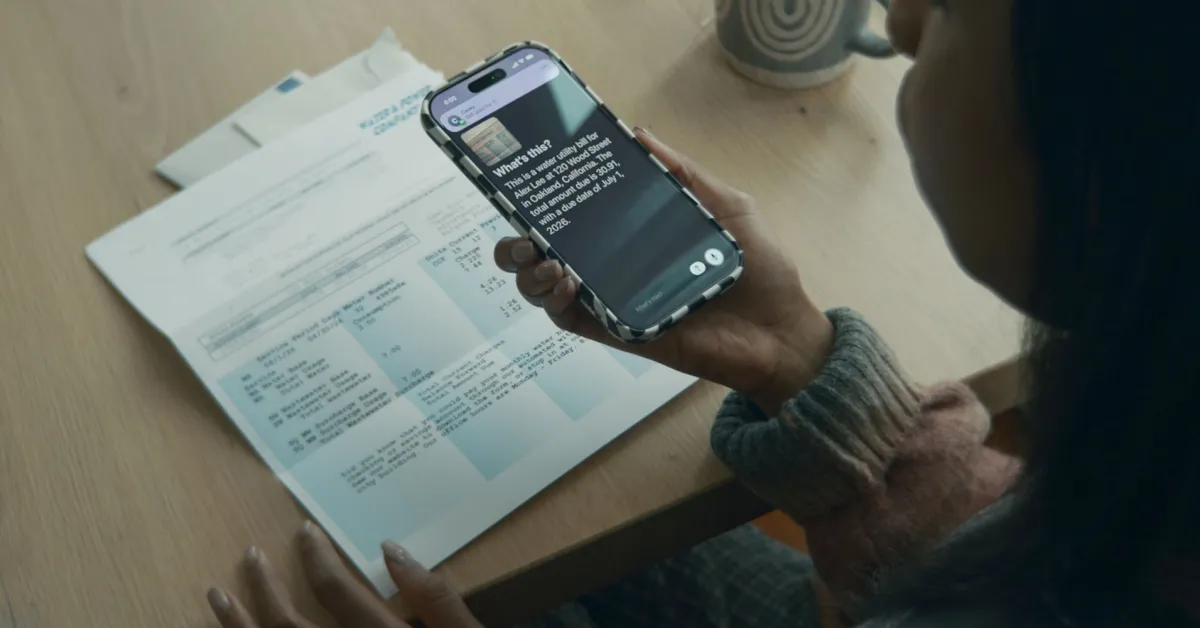
VoiceOver’s Image Explorer uses Apple Intelligence to provide more detailed descriptions of system-wide images, including the contents of photographs, scanned invoices, personnel records, and other visual content. With updates to Live Recognition, VoiceOver users can press the Action button on iPhone to quickly ask a question about what’s in the camera’s viewfinder and get a detailed answer. Users can also ask follow-up questions in their own words to get more visual information.
The magnifying glass also works with the Action button so users can quickly ask questions and get answers. And users can control the app itself with voice requests, such as “zoom in” or “turn on flashlight.”
Natural language in voice control
Until now, voice control required users to memorize exact words and phrases. With AI, Apple says the feature now allows people to use natural language.
With new flexible input, users can describe on-screen buttons and controls in natural language instead of memorizing exact labels or numbers. The “say what you see” option is ideal for navigating any app, including those with visual presentations like Apple Maps or Files, using intuitive language like “tap the best restaurant guide” or “tap the purple folder.” It can also help users overcome obstacles when items are not properly labeled for accessibility.
Accessibility Reader becomes smarter
For those who struggle to read text, Accessibility Reader is now significantly smarter.
Accessibility Reader is a personalized reading experience for users with a wide range of disabilities, from dyslexia to low vision, and thanks to Apple Intelligence, the reading experience is more accessible than ever. Accessibility Reader works on more complex source documents such as scientific articles, processing text with multiple columns, images and tables. On-demand summaries offer readers the opportunity to preview the article before diving into the details. And with the new built-in translation, users can read text in their native language while retaining custom formatting, font, and colors.
Subtitles for all videos
Any video can now be captioned with AI-generated subtitles. This includes video clips received from family and friends as well as those posted online. This has the potential to be transformative for users who are deaf or hard of hearing. On-device captioning is used to maintain privacy.
While closed captioning solutions are increasingly common for users who are deaf or hard of hearing, closed captions for spoken dialogue are rarely available for home videos, content shared by friends and family, and other media. With newly generated captions, videos can automatically display spoken audio transcriptions when captions or subtitles are not already provided, including in clips saved on iPhone, received from friends and family, or streamed online. With on-device voice recognition, captions are privately generated and automatically appear for uncaptioned videos on iPhone, iPad, Mac, Apple TV, and Apple Vision Pro.
Controlling the electric wheelchair in Vision Pro
Although some power wheelchair users have enough movement to use joystick controls, this is not the case for everyone. Users will now be able to use vision control in Vision Pro.
Leveraging Apple Vision Pro’s precision eye tracking system, a new power wheelchair control feature gives users a responsive input method for compatible alternative driving systems. With Vision Pro, eye tracking does not require frequent recalibration and works in a variety of lighting conditions. The feature launches with the Tolt and LUCI alternative driving systems in the US, with accessory support for Bluetooth and wired connections.
Apple says other wheelchairs will be supported over time.
Other accessibility improvements
Apple also listed a number of additional accessibility improvements.
- Vehicle movement cues come to visionOS, which can help reduce motion sickness for people who use Apple Vision Pro as a passenger in a moving vehicle. Vision Pro will also support facial gestures for performing taps and system actions, as well as a new way to select items with the eyes while in use. Stay control.
- Tap Hosting offer a new way to customize configuration in iOS and iPadOS.
- Designed for iPhone hearing aids Pair and transfer Apple devices more reliably, with an improved setup experience across iOS, iPadOS, macOS, and visionOS.
- Larger text Support is coming to tvOS, so visually impaired viewers can increase the size of on-screen text to be easier to read.
- Name recognitionwhich can alert deaf or hard of hearing users if someone says their name, works in more than 50 languages worldwide.
- For developers of sign language interpreting apps, a new API helps users add a human interpreter to a running program. FaceTime video call.
- Those who have difficulty interacting with traditional controllers can now connect the Sony Access Controller as a game controller with iOS, iPadOS and macOS. Users can configure the controller, nine built-in buttons, and up to four additional external buttons or specialty switches to customize the layout. They can also combine two controllers for a deeply personalized gaming experience.
Take from 9to5Mac
AI goes way beyond chatbots. Although Apple has been criticized for being slow to adopt AI features, accessibility features are certainly a great priority. This also indicates that there will be many other things that the company is quietly working on behind the scenes. I really hope to see many new AI developments announced at WWDC.

FTC: We use automatic, revenue-generating affiliate links. More.