
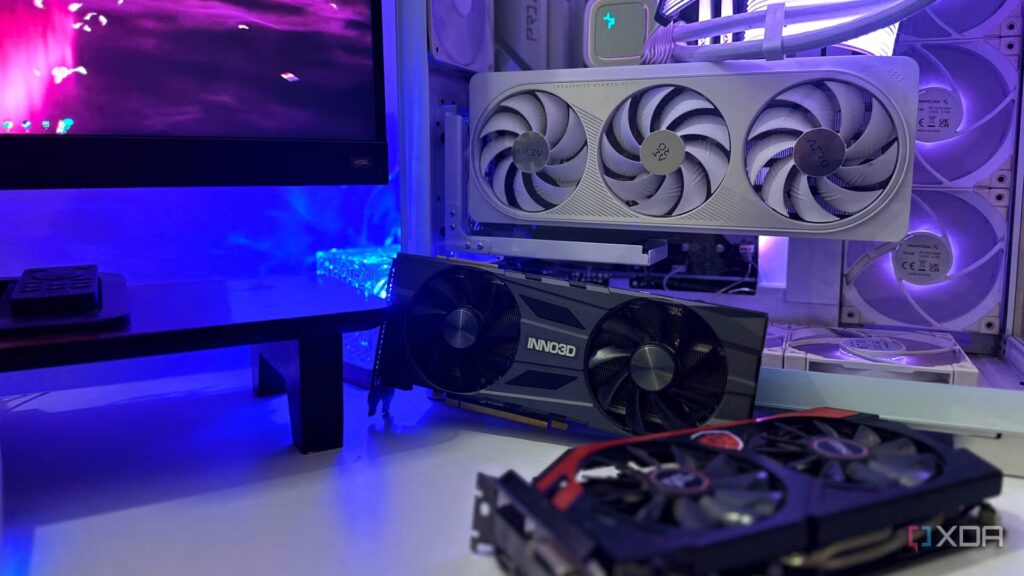
Today’s GPUs are absurdly powerful, and there’s no denying that. Even mid-range cards can blast their way through games that would have melted high-end hardware just a few years ago. And yet, despite all this raw power, we’re still pushed to tweak settings just to get the “right” experience. Whether it’s lower latency, smoother frame rate, better power behavior, or fewer glitches, we all need to delve into our GPU’s driver settings, looking for the toggles we just discovered exist.
The problem here is not one of access, but rather fragmentation. I may not have abandoned Nvidia GPUs in over a decade, but I’ve built and configured enough PCs with Intel ARC and Radeon RX GPUs to know that the settings just aren’t familiar between brands. This applies even more to those “secret” tweaks that YouTube promises will double your frame rates and fix all your problems. Every time you change GPUs, you’ll always have to learn a whole new language, even if it describes the same settings and features.
5 things I wish I knew before switching from AMD to Nvidia
Knowing these things would have made my life easier
Three different sets of the same settings
And none of them talk to each other
At a fundamental level, GPU performance tuning is no longer a mysterious art. The basic ideas have been there for years now: you just reduce input latency, optimize shader compilation in every way possible, manage power states, and ensure consistent frame delivery, with maybe an undervolt or overclock to boot. These things have now become baseline expectations, but even then each GPU vendor insists on wrapping them in its own terminology, as if the underlying principles are somehow proprietary.
One of the biggest offenders is latency reduction. Nvidia supports it via Reflex and Low Latency modes. AMD counters with “Anti-Lag” and “Anti-Lag+”. Of course, Intel is no slouch, so it relies on its own PresentMon-style telemetry-related latency reduction stack. Now, under all of these brands, all of these brands are still trying to solve the same problem, but the way they present them makes them seem unrelated or even incompatible.
It’s just unnecessary friction created for the sake of it. I won’t learn any new features or architecture by moving to a new GPU. Every time I change ecosystems, I have to second-guess myself, googling “AMD or Intel equivalent of Feature X” to make sure I don’t click the wrong button. Having three dialects of the same language serves no purpose, except perhaps to tech YouTubers, who can now sell the same advice to three separate user bases via three different videos.
5 Things to Note When Replacing GPUs from NVIDIA to AMD
There are important factors to consider when moving to the red team.
There is no consistency across the three control panels
AMD, Nvidia and Intel can’t agree on how to tweak your hardware
On the surface, it’s only fair that each GPU vendor approaches its control panel with proprietary software. The end result, however, is a trio of tools fundamentally out of sync with each other. With the Nvidia Control Panel (or the Nvidia app or Profile Inspector), you’ll see a legacy interface that hasn’t changed significantly in over a decade. It’s functional, sure, but also profoundly unintuitive today. The Nvidia app was created to solve this problem, but it doesn’t have as many settings as the Control Panel, making both apps essential to having the right experience. You end up bouncing between the two just to piece together a complete setup.
On the Team Red side, AMD’s Radeon Software Adrenalin Edition is modern, elegant and much more unified. And yet, open it and spend five minutes on it, and you’ll see how full of pimples it is. They all have her useful, but they start to overlap the more you pay attention to them. There’s Boost, Chill, Anti-Lag, Anti-Lag+, and Enhanced Sync, just to name a few. Each undoubtedly makes sense in isolation, but their interactions aren’t always obvious, nor are they obvious unless you Google them or watch a video online to understand things better.
And then, of course, there’s Intel Arc Control, which looks refreshingly clean at first glance. This software has had the most time to learn from others during its development, building on years of development in the other two applications. And yet the problem persists, because the more time I spend in Arc Control, the more I notice features that are still maturing or simply not available to be tweaked in the same way that AMD or Nvidia allow. Hell, that’s true even for AMD’s Adrenalin, which doesn’t let you configure your shader cache size like Nvidia does. Every time I try to set up something on my best friend’s PC who uses an RX 9060
4 reasons why AMD’s Adrenalin software is no match for NVIDIA’s app
AMD’s Adrenalin app falls short of NVIDIA’s new consolidated app in a few key areas of this GPU software ecosystem comparison.
Community workarounds and hidden tweaks aren’t really a good thing
Why does Reddit know my GPU better than its manufacturer?

It’s no secret that the most effective performance improvements today come from forums, GitHub threads, and years of trial and error from users who like to take matters into their own hands. Nvidia users, for example, have long relied on the Profile Inspector or one of its forks to access driver-level flags that never appear in the standard Control Panel or Nvidia app. AMD also has its own ecosystem of registry edits and hidden toggles, all of which unlock behaviors you won’t find obvious anywhere. Intel users also often have to rely on third-party overlays and telemetry tools just to get a clearer picture of what’s really happening underneath their ARC GPUs. For power users with time on their hands, a Google search and a YouTube tutorial (or ten) might solve this problem. But for the average user who mistakenly thought their $1,000 GPU was plug-and-play, this creates a whole host of features and performance improvements that they paid for, but are ignoring.
The fact is that this shouldn’t be normal. When a Reddit post from three years ago tells you how to troubleshoot your GPU driver, something has clearly gone wrong. These are major tweaks too, which directly impact performance, stuttering, responsiveness and much more. We’re not talking about obscure edge cases here, but rather core features that every GPU should have already enabled.
I consider this much more of a design flaw than a benefit to the power user. We can talk about “hidden features you don’t use in your GPU” all year, but they shouldn’t be hidden in the first place. If the community often has to map out the optimal paths, the least GPU vendors can do is meet them halfway and present these options in a way that doesn’t require a full weekend of research to understand.
5 ways Nvidia app lags behind AMD Adrenalin
AMD’s GPU software is packed with handy features.
Changing hardware shouldn’t necessarily mean relearning features The next step forward should be consistency and a shared language.
We’ve spent years researching higher frame rates, better ray tracing, and smarter scaling. To be honest, we certainly have it all figured out too. The experience of actually using however, on a daily basis – having to understand them and then compose them – always seems strangely behind the times.
The next real step forward should be nothing other than consistency and a shared language. Changing gear shouldn’t mean relearning everything you thought you already knew. Right now, the hardest part of GPU performance is anything to do with the hardware rather than the hardware itself, and that needs to change immediately.
