
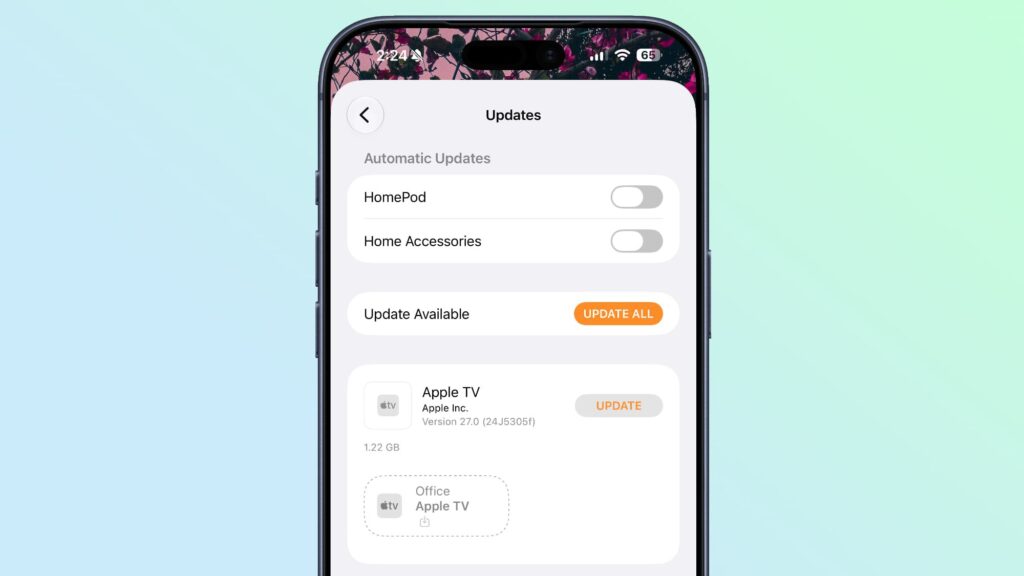
In iOS 27 beta 2, Apple updated the Home app to add support for remotely updating an Apple TV.
The Apple TV is now listed in the Updates section of the Home app’s Settings interface, and tapping the update button on the Apple TV installs the latest software without needing to turn on the Apple TV.
The HomePod and HomePod mini have long been able to be updated via the Home app, so the iOS 27 change for the Apple TV puts it on par with the HomePod. The HomePod and HomePod mini run a variation of tvOS, so it makes sense that the Apple TV would be updated the same way.
Apple’s decision to add Apple TV to the Home app’s update interface suggests that the next home hub device in the works will also be controlled and updated through the Home app.
Apple is expected to launch a dedicated home hub later this year, and it will run a version of tvOS like the HomePod. It will be a centralized place to control smart home products, make video calls, get information such as the current weather, and interface with Siri. The device is expected to have a 7-inch square screen with built-in speakers, and it could be a HomePod-iPad hybrid.
Popular stories
Apple Seeds Offers Early Betas of iOS 26.6 and iPadOS 26.6 to Developers
Apple today released the first beta versions of the upcoming iOS 26.6 and iPadOS 26.6 updates to developers for testing, with the software available two weeks after Apple released iOS 26.5 and iPadOS 26.5. Registered developers can download beta versions from the Settings app on iPhone or iPad by going to the General section and selecting Software Update. As the launch of iOS 27 approaches in…
Apple releases iOS 26.5.1 to fix charging issue on iPhone Air and iPhone 17 models
Apple today released iOS 26.5.1, a minor update to iOS 26. The software is available three weeks after the release of iOS 26.5 and appears to only be available for the iPhone Air and all models in the iPhone 17 line. The new software can be downloaded over-the-air to eligible iPhones by going to Settings > General > Software Update. According to Apple’s release notes, the update fixes a previous…
iOS 26.6 will alert you when you have reached the maximum blocked contacts
Apple’s iOS 26.6 update appears to add new wording regarding blocked contact limits, although it’s unclear whether the actual limits have changed. The beta code suggests that users will receive a warning if they exceed the maximum number of blocked contacts. “You have reached the maximum number of blocked contacts. To block additional callers, delete a blocked contact in Settings,” reads the alert, which is…
